What a Retail Barcode Actually Tells a Scanner
A retail barcode identifies an item, while store software supplies its details. Learn how the lookup works and how to spot a mismatch before checkout.
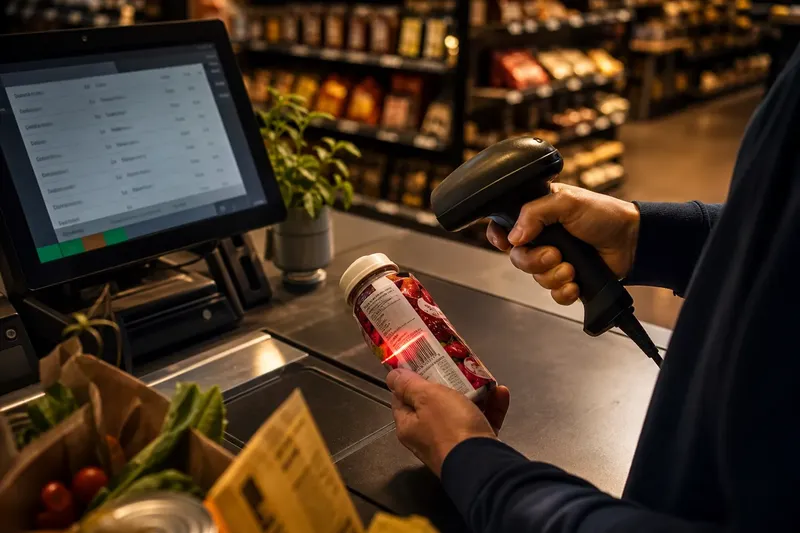
A retail barcode identifies an item; it does not tell a scanner the full story of the package. A scanner reads a symbol, and the checkout system uses the decoded information to look up the item it believes is in front of it.
What does a retail barcode contain?
Common retail formats such as UPC and EAN encode an identifier. The printed bars do not spell out the product’s brand, ingredients, flavor, or package size. Those details are usually held in a product catalog and associated with the identifier.
The digits printed below the bars let a person read the identifier without a scanner. On their own, those digits still do not describe the item. They are a reference, not a miniature product label.
Some barcode formats can carry additional data, but what a symbol contains depends on its format and how it was created. A QR code might encode text or a web address; if it points to a product page, the page itself remains on a website rather than inside the printed squares.
How does a barcode lookup work?
A scanner detects the light and dark pattern and decodes the symbol into data. Checkout software then uses that data to retrieve a matching catalog entry. Depending on the store’s setup, the entry may be available on the checkout device, through a network service, or through synchronized systems.
The catalog entry can supply a product name, selling unit, and other details used by checkout, inventory, or ordering tools. Those details come from the software and its records, not from hidden text in the bars.
Because the process is quick, it can look as if the scanner recognizes the product. It does not. It reads a symbol and hands its contents to software that interprets them. A scanner can decode a symbol successfully while the system fails to find a useful match.
Why separate an identifier from a product description?
A short identifier is easier to print and scan than a full description. It also lets different business systems refer to an item while keeping the details in a catalog that staff can update and use in different ways.
A record might include the item’s name, brand, selling unit, supplier reference, and category. Checkout may display only a few fields, while an inventory tool uses others. Keeping the description in software allows the relevant systems to use the information without crowding the package label.
The separation has a limit: a record can be attached to the wrong item, and a package can be mislabeled. A code does not resolve those disagreements by itself. The retailer still needs clear procedures for adding products, approving changes, and sending updates to the systems used at checkout.
What can go wrong between a label and its lookup?
A damaged, folded, or smudged symbol may be difficult to scan. If the scanner reads it but the system returns no match, the item may be absent from the catalog or the relevant system may not have received an update. If a result appears but names a different variant, the record may be incorrect or linked to the wrong code.
Imagine a shop receives a new flavor of a packaged drink. An employee scans it, but checkout reports an unknown code. The employee checks the package digits against the supplier’s product information, confirms the item is not in the catalog, and asks an authorized colleague to create the matching entry. A later scan now displays the intended item name; if it had displayed a different flavor, the next decision would be to review the existing code-to-item link before selling it under that entry.
These problems call for separate checks: can the symbol be read, does the catalog contain a match, and does that match describe the exact item? Replacing a scanner will not fix a missing record, and editing a record will not repair a damaged label.
What should a retailer check when a scan looks wrong?
For each check, the result should lead to a specific action rather than an improvised catalog edit.
- Check symbol condition: If the bars or squares are torn, folded, or obscured, then use an approved alternate way to identify the item and request a sound label; if the symbol looks intact, then continue to the catalog check instead of replacing equipment immediately.
- Check the decoded digits: If the digits shown by the checkout system differ from the visible digits, then clean or reposition the package and scan again; if they agree, then investigate the catalog match.
- Check catalog presence: If an exact item entry is absent, then follow the store’s process for adding it; if an entry exists, then compare its details before changing anything.
- Check the variant: If the record names a different flavor, size, or color, then hold the item for review and correct the code-to-item link through an authorized process; if the variant agrees, then check the selling unit.
- Check the selling unit: If the package is a multipack but the entry describes a single unit, then select or create the correct unit record; if the units match, then check whether the displayed information is current.
- Check system updates: If one checkout device has an older entry than another, then follow the store’s synchronization process; if all devices show the same result, then escalate a suspected catalog error rather than repeatedly rescanning.
What questions do shoppers and students ask about barcodes?
Does a retail barcode contain the price?
In many retail systems, the symbol identifies the item and checkout software retrieves the selling information from its records. Some formats can encode additional data, but a common retail barcode should not be assumed to carry a fixed price.
Can two products have the same barcode?
Catalogs need identifiers that let their systems distinguish items as required. If a code is reused or attached to the wrong entry, a scan may return a misleading result; staff should check the package and catalog before correcting the record.
Why might a scanner reject a barcode?
The symbol may be hard to read, or the system may lack a matching entry. A rejection alone does not identify the cause, so check the printed symbol and the catalog separately.
Does a QR code work the same way?
A QR code can encode text, a web address, or other data, depending on how it was made. A link may lead to fuller information, but that information lives at the destination rather than being contained in the printed symbol.
What is not worth the effort?
Treating every failed scan as a hardware problem is rarely useful. First distinguish a reading failure from a missing or incorrect catalog entry. A barcode’s visible pattern is only one part of the transaction; the less visible lookup is where the item gets its name.
Why does this distinction matter in commerce?
For a student at Trường Đại học Thương mại (TMU), a checkout scan offers a concrete view of how retailers classify goods and connect physical products to software. Suppliers, sellers, and checkout systems may describe an item differently, so the catalog needs to translate between those working contexts without confusing one variant for another.
When a barcode returns the wrong item, the practical question is not whether the scanner understands the package. It is which part of the chain needs attention: the printed symbol, the catalog entry, or the update process. Keeping those possibilities distinct helps staff make a targeted correction instead of turning one small mismatch into several.